Getting Started
PosterFlow is a Windows desktop application for managing and displaying rotating movie poster artwork across one or more screens. It is designed for home theater, media room, arcade, and cinema-style display setups where you want poster artwork to feel intentional instead of random.
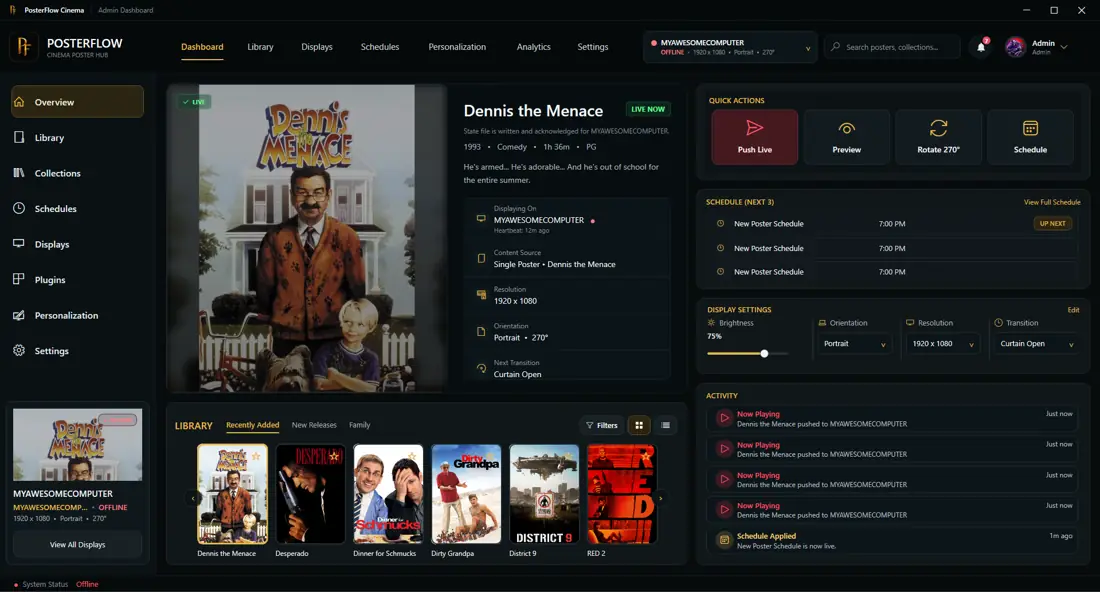
Two main partsThe Admin Console is where you manage posters, collections, schedules, display settings, plugins, and updates. The Display Client is what actually shows poster artwork on a screen.
Recommended reading order
What you will set up
A typical first setup includes:
- installing PosterFlow on Windows
- activating Early Access, when required by the build
- opening the Admin Console
- adding or importing poster artwork
- choosing library, personalization, and display settings
- opening the Display Client
- using Push Live or the equivalent display workflow to send the selected poster experience to the screen
Early Access note
PosterFlow is documented here as an Early Access supporter build. Features, labels, and exact screen layouts may change as the app develops. The docs focus on customer-facing behavior and avoid implementation details that users do not need to configure directly.