Library
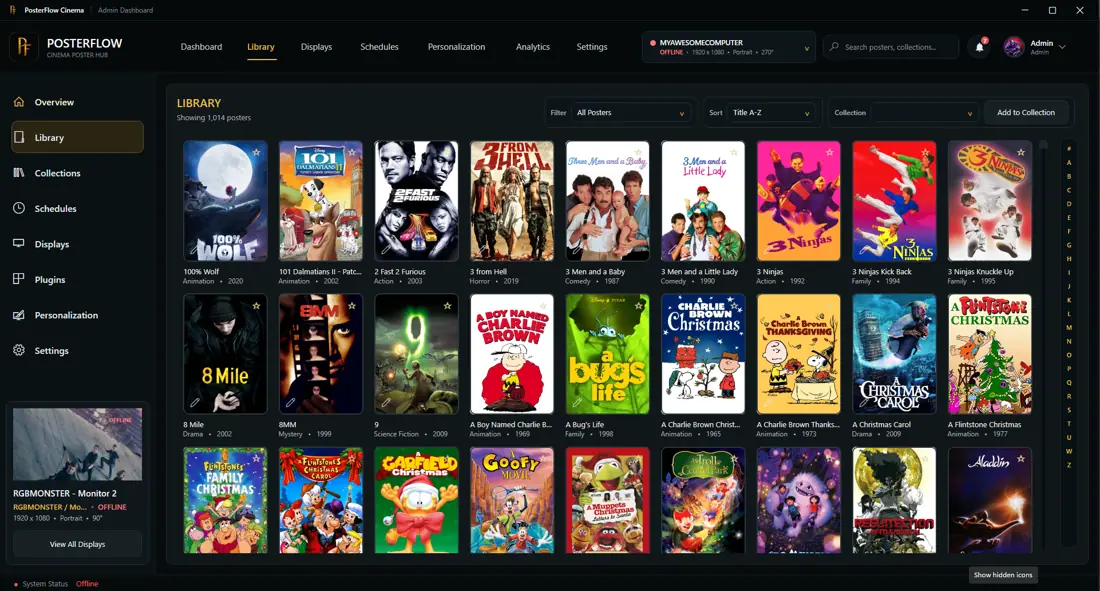
The library is where PosterFlow brings together poster artwork, title browsing, favorites, collections, and metadata.
What belongs in the library
A PosterFlow library can include poster artwork and metadata for movies or media titles you want to show on your display. Depending on the build and enabled plugins, metadata may come from local information, NFO-style files, supported media tools, or supported content providers.
Common library areas
- Title A-Z browsing for alphabetical navigation
- Favorites for quick access to preferred posters
- Recently Added shelves for newer library items
- New Releases shelves where provider or metadata information supports it
- Search for finding titles quickly
- Collections for themed or curated groups
Internal library mode
Internal library mode is best when you want full control over the posters that appear. Use it for curated home theater collections, themed display lists, favorite titles, or manually managed artwork.
Metadata
Metadata helps PosterFlow label, sort, and present items. Metadata may include title information, provider details, ratings, studios, codecs, aspect ratio, release information, or other fields depending on the source and build.
Good library habits
- keep poster artwork organized before importing large sets
- use clear title naming where possible
- verify imported metadata before relying on schedules or collections
- test a small group first before importing a large library