Schedules
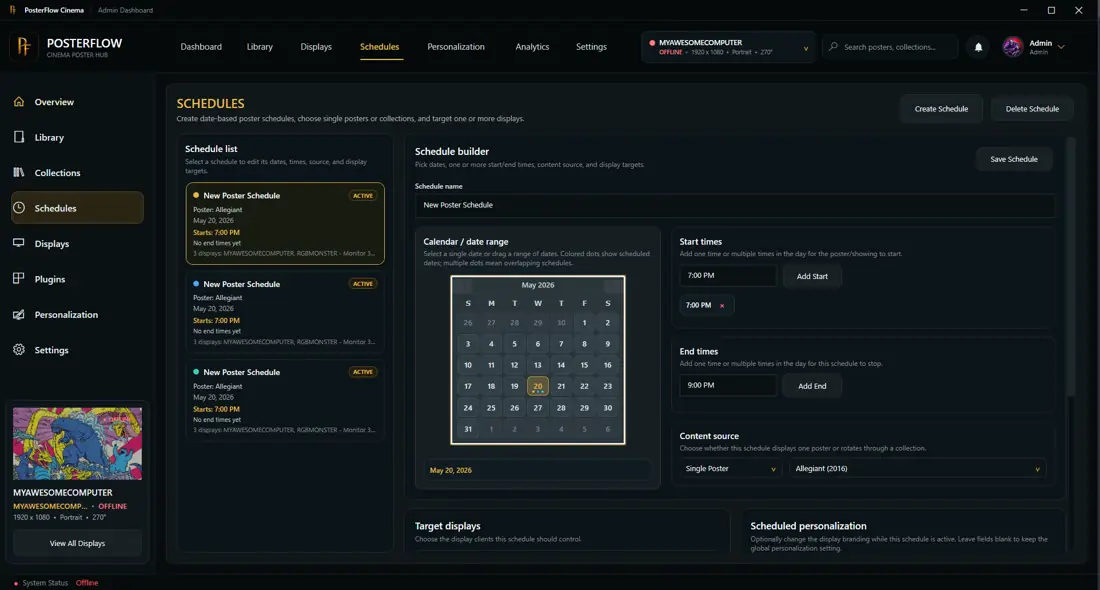
Schedules let PosterFlow control which posters appear at specific times or in specific lineup sequences.
When to use schedules
Use schedules when you want PosterFlow to change the display automatically. Examples:
- show holiday posters during a specific week
- switch to family-friendly artwork in the afternoon
- display a featured lineup before movie night
- rotate through a themed collection during an event
- promote upcoming movies or selected favorites
Basic schedule workflow
- Open the schedule area in the Admin Console.
- Create or edit a schedule.
- Choose the content source, collection, or lineup.
- Set the timing.
- Preview the behavior if the build supports previewing.
- Save and test the Display Client.
Lineup behavior
When documenting lineup movement, use plain language:
A single scheduled item slides up from the bottom. Multiple scheduled items cycle through the lineup and stop after the final item has fully appeared.
Tips
- Test with a short schedule before relying on it for an event.
- Keep schedule names clear, such as
Halloween EveningorFriday Movie Night. - If the wrong content appears, check whether another schedule is active or whether the Display Client was refreshed after saving.